
When I first started using Google Keyword Planner for SEO I have to admit I was really confused.It wasn’t about logging in or using the tool. About finding the right keywords.There were many suggestions on the screen lots of numbers everywhere and I had no idea which ones were good to target or which ones would really make a difference.
If that sounds like you, you’re in the place.
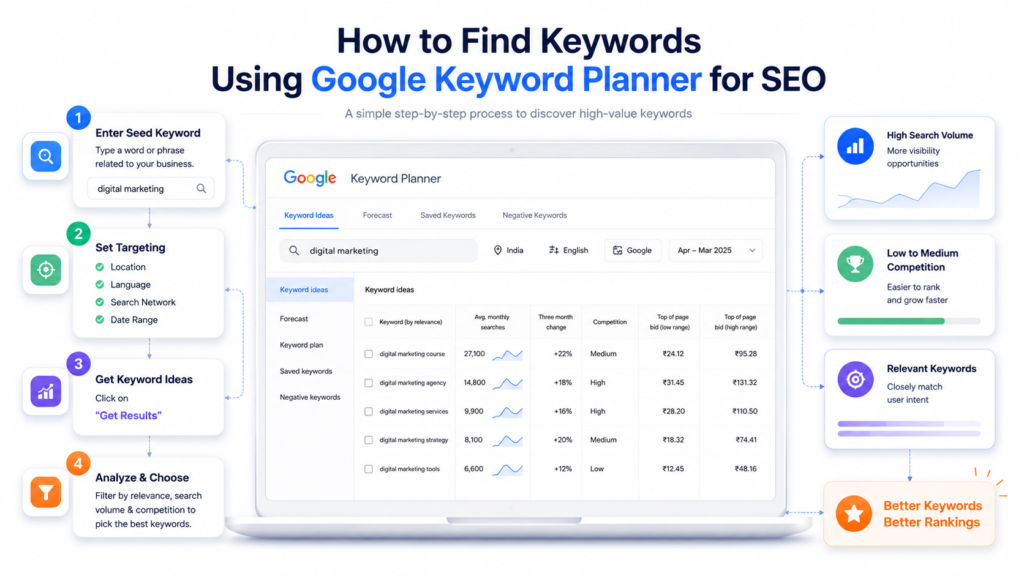
In this guide I’m going to show you how to find keywords using Google Keyword Planner for SEO step by step the way I do it for my own projects and for clients.I’m not going to give you any theory or complicated stuff.
Just a simple process that works especially if you’re just starting out with Google Keyword Planner.
I’ll walk you through it like I did today.
It is a process.
What Is Google Keyword Planner and Why Does It Matter for SEO?
Google Keyword Planner is a free tool inside Google Ads that was originally built for advertisers. But digital marketers figured out quickly that it’s also one of the most reliable tools for SEO keyword research — because the data comes straight from Google itself.
When you use Google Keyword Planner for SEO, you’re looking at real search behaviour: what people are actually typing into Google, how often they’re searching, and how competitive those keywords are. That’s powerful — and the best part is, you don’t need a paid subscription to use it.
Before You Open The Tool: Start With A Brainstorm
I always tell people who’re new to this especially people in Kochi and Kerala who are just starting out with digital marketing that they should not open the tool without a plan.
Step 1: Use Google Keyword Planner for SEO
First you need to go to the Google Ads website at ads.google.com and sign in with your Google account. If you don’t have a Google Ads account create one. Don’t worry you won’t have to run ads or spend money. When prompted Switch to Expert Mode” and skip creating a Google Ads campaign. This will give you access to Google Keyword Planner for SEO.
Once you’re inside Google Ads click the Tools icon at the top. Select Google Keyword Planner under the Planning section. You can find it under Planning in Google Ads. Here you can use Google Keyword Planner for your SEO needs. Get the most out of it. Google Keyword Planner will help you with your SEO. You can start using Google Keyword Planner today.
You can find Google Keyword Planner, in Google Ads and Google Keyword Planner is a tool. Google Keyword Planner can help you plan your SEO strategy.
Step 2: Choose “Discover New Keywords”
You will see two options inside Google Keyword Planner.
- Discover keywords is where you start with a topic or a keyword and Google gives you related ideas.
- Get search volume and forecasts is for when you already have a list of keywords and you want to know more about them.
If you are new to doing SEO keyword research you should always start with Discover keywords.
This is a way to begin.
Type in the keyword for the topic you are working on.
For example if you are writing a blog post about marketing services in Kochi you might type in “digital marketing Kochi” or “SEO services Kerala”.
Google will then give you a list of keyword ideas with some extra information.
You will get a list of keywords related to marketing services, in Kochi or SEO services Kerala from Google.
The list will have Discover keywords that you can use for your blog post.
Step 3: Look at Search Volume First
When the results come up you will see columns for keyword ideas average monthly searches, competition and more. When I am reviewing a keyword list the first thing I look at is search volume. The average monthly searches column.
Here is the range I personally target for search engine optimization for new websites or newer clients: 100 to 1,000 search volume per month.

I know that might sound low if you have heard about chasing keywords with 10,000 or 100,000 search volume.. Here is the reality: high search volume keywords are almost always dominated by big websites with massive authority. Think Wikipedia, Forbes or national brands. A new or growing website has zero chance of ranking for those search volume terms in the near term.
Keywords in the 100 to 1,000 search volume range are realistic. They have search demand to drive meaningful traffic but they are competitive enough to actually rank for search volume. Start with search volume, like this.
Step 4: Pay Attention to Long-Tail Keywords
When people start out with SEO they often make a mistake. They use Google Keyword Planner. They miss something important. They do not pay attention to long-tail keywords.
Long-tail keywords are phrases that’re a bit longer and more specific.
For example of using just “SEO” you should use “how to do SEO for a small business in Kochi”.
These long-tail keywords are searched a lot. Many people try to use them. Its easier to stand out.
People who search for long-tail keywords usually want to take action.
When you look at the keywords Google Keyword Planner suggests find the long-tail keyword phrases.
Long-tail keywords are what really help beginners. They are easier to rank for. They bring people to your site who are really interested. These people are more likely to do something.
Here’s something you can try: sort the list of long-tail keywords from the ones, with competition to the ones with high competition.
You will often find that long-tail keywords have competition.
Step 5: Check the Competition Column
When using Google Keyword Planner look at the Competition column. It shows Low, Medium or High.. Do not get it wrong. This column is about advertiser competition not how hard it is to rank in search engines.
Many people get confused about this. A keyword with competition means many advertisers are bidding on it in Google Ads. It does not mean it is hard to rank in search engines.
Use the competition info as a guide. Do not rely on it. If you want to know how hard it is to rank in search engines you may need a tool like Semrush or Ahrefs.. If you have no money Google Keyword Planner and good judgment can help you a lot.
The Google Keyword Planner tool is very helpful.
Use Google Keyword Planner to find keywords.
Check the Competition column, in Google Keyword Planner.
Step 6: Set Your Location and Language
When you are doing search engine optimization for a business like a business in Kochi or Kerala you need to set the location in Google Keyword Planner to the place where your businesss
You should click on the location settings at the top of the page where you see the results. Then you need to change it from the country to the city or region where your business is like Kochi or Kerala. This way you will see the search numbers that people in Kochi or Kerala are looking for, not the whole country.
A lot of people forget to do this. It is very important for search engine optimization in your area because it helps you find the words for your business in Kochi or Kerala. This can make a difference in which words you should use for your business, in Kochi or Kerala.
Why Most Bloggers Get Keyword Research Wrong

Before anything I want to talk about the biggest mistake I see bloggers making when they first find out about Google Keyword Planner for SEO. They go to the keywords with huge numbers.
They see a keyword with 50,000 or 100,000 searches every month. Think. That’s the one I want. That’s how I get traffic.. Honestly it’s a normal reaction. More searches mean people seeing my site right?
Not really. Not when you’re just starting out.
Those keywords with searches are already being targeted by big websites that have been around for years. They have thousands of links to their site. Publish new content every day. Trying to rank for them as a blog is like showing up to a big race in a small car. You might be driving well.. The other cars are much faster.
The best keywords for bloggers using Google Keyword Planner for SEO are those that get between 100 and 1,000 searches a month. That range might not sound exciting. Those are the keywords you can actually rank for.. When you create many pieces of content, around them the traffic adds up quickly.
Why Most Bloggers Get Keyword Research Wrong
When bloggers first learn about Google Keyword Planner for SEO they usually make a mistake. They look for keywords that have a lot of searches.
They find a keyword with 50,000 or 100,000 searches. Think that is the one they want. They think that is how they get traffic. It sounds good more searches should mean visitors right?
That is not really how it works, especially when you are just starting out. It is not that simple.
The Real Secret is to Keep it Simple and Consistent
Google Keyword Planner for SEO is a tool it is not magic. If you use Google Keyword Planner for SEO well it helps you understand what your audience really wants. This is very helpful for bloggers who want to create content that people will find.
Here is what you should do. Think of ideas then use Google Keyword Planner for SEO to see if they are worth writing about. Look for keywords with 100 to 1,000 searches. Focus on long-tail keywords these are keywords that have searches but are more specific. Then write something for the person who will read Google Keyword Planner for SEO content.
That is it that is the thing. Bloggers who get Google Keyword Planner for SEO right do not just write content they write Google Keyword Planner for SEO content that keeps working for them long after it is published. In a world where everyone is fighting for attention this makes a difference.
They keep writing Google Keyword Planner for SEO content using Google Keyword Planner for SEO for SEO. That is why their Google Keyword Planner for SEO content keeps working.
They are not just writing for the sake of writing they are writing Google Keyword Planner for SEO content to help people who use Google Keyword Planner, for SEO.